ASSA ABLOY browser game

ASSA ABLOY browser game

Browser game

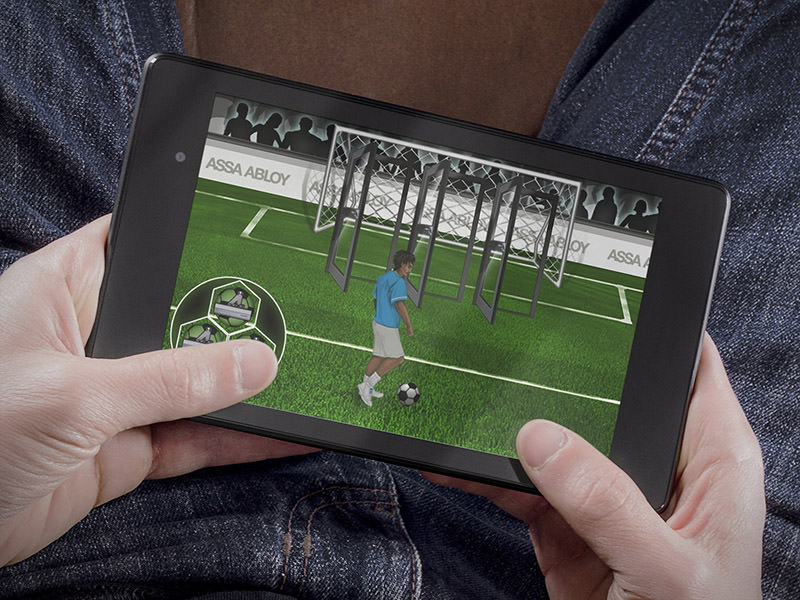
The ASSA ABLOY browser game was created as part of the soccer World Cup. Our team is proud to have realized this project and you can play it yourself here! Don't worry, no data is collected in this version and no newsletter is sent.

In this game, you are the goalkeeper! Drag the door closers onto one of the three doors to trigger a shot and see if you have „held“ the ball!

Implementation

The game was implemented without the use of Flash, but purely with the possibilities offered by HTML5, CSS3 and JavaScript. After a draft of the game design and the game, suitable sounds were selected to support the gameplay. The animations are deliberately kept simple and the only effects the game allows itself are the „Yeah“ and „Oooh“ for the respective hits or held balls. The lack of effects was done in favor of a truly random and physically at least comprehensible ball movement.

Features

In addition to the implementation of the actual game, a newsletter system was integrated that allows participants to take part in a prize draw. The newsletter system remembers the balls held (which incidentally have no influence on the prize draw) and then emails the data to the customer server. The newsletter system appears at the end of the game and can also be viewed and tested in our demo embedded here, but it does not send any e-mails.

Thank you very much for the pleasant and professional cooperation. Not only we, but also the customer is very satisfied with the result. Not only were we supported with the implementation, but you also provided great suggestions with your specialist knowledge. Another star for the great availability and quick implementation of changes.
Sarah Danielle Hein

ThePeopleForCommunication

Slidecast jQuery Mobile Solution

Slidecast jQuery Mobile Solution

This project is a web application (WebApp) that makes it possible to make presentations with graphics, audio, video and even HTML elements available to a large number of interested parties at the same time. It thus follows the principle of a distributable slidecast application.


Definition of WebApps


The term is derived from the English and refers to an app(lication), i.e. applications for mobile devices that can usually be downloaded directly from the Internet via a browser integrated into the operating system and used without installation.

In principle, these are websites optimized for smartphone displays that attempt to replicate the „look and feel“ of native applications.

WebApps development

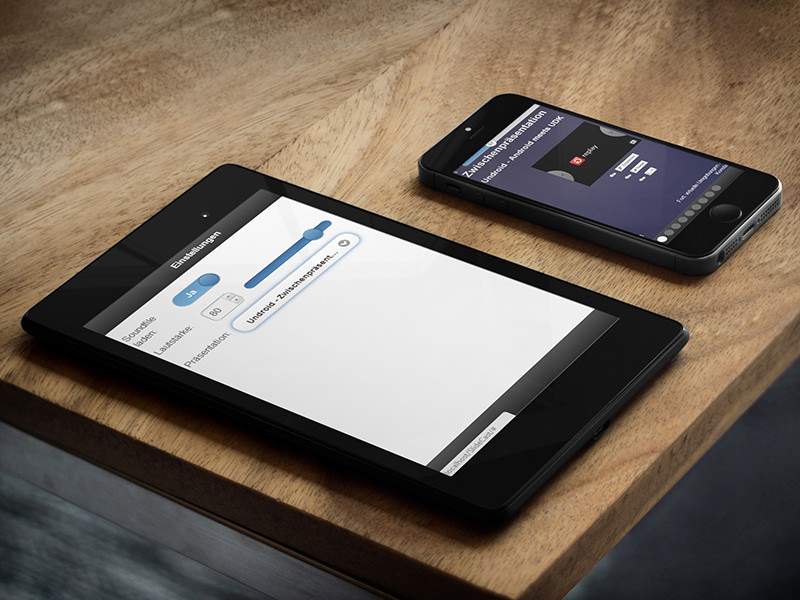
jQuery Mobile App opened on Samsung Tablet
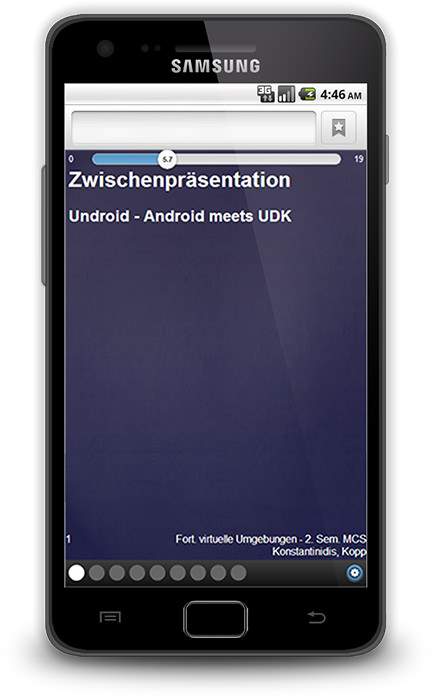
jQuery Mobile App opened on Samsung Smartphone

Why WebApps and jQuery Mobile?

Many users have become very cautious due to the potential presence of malware in the app stores. WepApps support the user in such a way that no installation is necessary and the application has no access to the smartphone's software and hardware. In principle, these types of applications are also more secure against piracy. Because the application is located on the server and generates content dynamically, it cannot simply be copied and possibly used for fraudulent activities. With native apps, personal data could be sent on in the background without the user's knowledge. Another advantage is that the application can be called up from all devices with internet access and, for example, stored data can be accessed. To give an example, games could be started on a smartphone and then simply played on a computer without having to exchange complicated data between these devices. Well-known and proven technologies are used, guaranteeing a high level of future-proofing.

jQuery Mobile is a touch-optimized web framework for smartphones and tablets. It offers numerous support options for recognizing touches, gestures and other things. A large number of browsers are supported, and others can also be added if you have sufficient programming skills.

Why implement something new at all? There are already plenty of ways to distribute presentations.

Of course, various options already exist, such as simply distributing presentation documents by e-mail, generating PDFs or using platforms such as www.slideshare.net to use. The advantages of this new approach include the following:


Separate graphics and audio, no video!


It is often the case at conferences that the presentations are recorded and made available on the web as a video. This naturally involves a large volume of data. In addition, you almost always need additional plug-ins such as Adobe Flash Player to watch the video. Smartphones usually do not support these plug-ins, and if they do, the battery is drained in a very short time. In addition, there is sometimes no WLAN access on the move. The finished videos are usually several hundred megabytes in size. This naturally puts an enormous strain on the mobile network and can lead to very long loading times.


Audio files do not need to be loaded!


If you don't have an Internet flat rate, mobile data volume costs a lot, so you want to have the choice of which content to load. The fallback to the purely text-based view can also significantly reduce the transferred volume here.


No installation, no additional software


Can be played directly in almost any browser


Presentation easily definable as HTML markup in a file


No additional program is required to create the presentations. An online editor was planned here, which also supports HTML laymen. It should not be a problem for more experienced users to create presentations.


Communication through comments


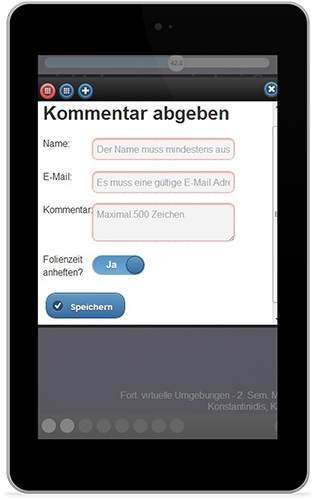
By implementing a comment function, comments can be attached to individual slides, the entire presentation or even to statements (points in time). This allows users to hold discussions and also ask questions about specific statements.


Harnessing the power of the web


Because it is a web application and the code has been structured accordingly, it is possible to use almost all the features of the web (videos, social media - „like me button“, ...)


Barrier-free (screen reader)


A screen reader can also be used to achieve accessibility and people with hearing or visual impairments, for example, can use this form of presentation.


Is it possible to buy or license this solution?


But of course you can! We are also able to respond flexibly to your wishes and modify or expand the application according to your specifications. Simply get in touch with us Contact us.

Shopware T-Shirt Designer

Shopware T-Shirt Designer

Shopware development

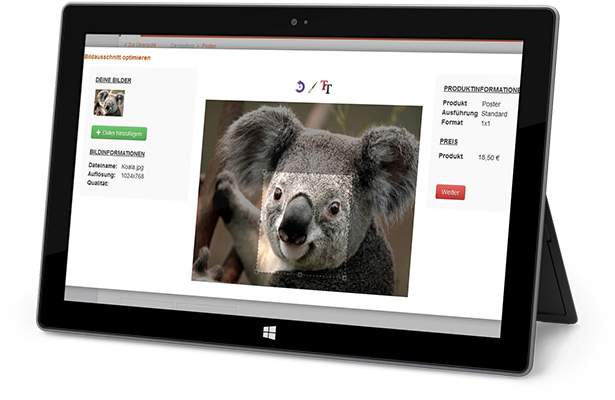
Shopware T-Shirt Designer, opened on a Microsoft Surface

For the store software „Shopware 4“ (https://www.shopware.de/), a poster designer has been developed which makes it possible to upload any motif or use an existing gallery.

Further functions are available for a selected motif, such as „Select section“, „Black/white“ or „Rotate“. Also conceived - but not implemented - was an „Add text“ function with which a customer could determine the font, color and position of the text.

The advantage of this solution was that it was not a plug-in technology, but everything was implemented using web technologies. In addition to HTML5, fallback mechanisms were also built in and Flash was only used in emergencies.

The solution was integrated into the existing software, which required in-depth intervention. This intervention was made possible with the help of additional databases or scripts. The new options are then available to a potential buyer in the detailed view of a product.

Individual module and interface development

Individual module and interface development

Development interfaces

Interface development symbol image with puzzle on Macbook

As a subcontract for a successful software company, we implemented a major project lasting several months. This involved the individualized creation of an interface for a proprietary merchandise management system for Joomla/Virtuemart. There were numerous technical hurdles to overcome: How is the data retrieved? How should the data ultimately be displayed? Here we provide a brief overview of the project and our approach.

Problem definition

The problem was as follows: The customer provides a proprietary merchandise management system that has an enormously large database in the background. The system is continuously maintained and modified. The data records stored there are used, for example, to generate catalogs or provide customers with information. The system has several interfaces, including standardized queries via MySQL. This was our starting point: the customer wanted the catalog to be dynamically loaded into a web-based catalog without further external intervention, to be searchable and to generate an always valid URL and a QR code for each item and to be able to narrow it down using many filter and search bar properties. The solution was to be designed modularly for use in Joomla as well as later for Typo3 and also as a complete integration into a store system.

Approach

First of all, we had the customer explain the problem in detail and defined milestones together with them. Based on these milestones, a cost estimate was drawn up and then incorporated into all the systems involved. A prototype was then created on the basis of this familiarization, which was intended to demonstrate and ensure the basic functionality of the system. This prototype was ready for use after just one working day.

After an interface conception and elaboration, the research for functional solutions for the content management system followed „Joomla“, on which we were able to base our solution. We quickly found „VirtueMart“ a popular and promising platform whose technology we have been able to utilize and gradually expand.

We had to create two direct connections and write a translator: On the one side, the proprietary structure of the customer's merchandise management system is read out, translated and standardized by our system and output again on the other side or read into VirtueMart. This module alone, with its several thousand lines of code distributed across a well-structured architecture in PHP, is absolutely unique.

In addition to this translator, several adjustments to the presentation were necessary. Here, we approximated the desired functionality as closely as possible with already available modules in order to minimize the customer's costs. These modules were further adapted by us, for example, the URLs of the front end were made „speaking“ - and it is now possible to address both products and any product structure levels, which was not possible without further ado. In particular, our adaptation means that any number of categories and structure levels can now be assigned, as the database is dynamically broken down into its components. The implementation was completely detached from Virtuemart and the design, i.e. in plain language: You can take any Joomla with Virtuemart and „let go“ of our extension and Virtuemart is then fed and modified with the data from the WWS. This makes the solution highly portable! An implementation in Typo3 has also already been planned and prepared accordingly.

Special features and Special functions

Where images for products are available in the database, the customer wanted the images to be imported automatically and assigned in the front end. Different sizes are generated for thumbnails as well as for the final view.

For each product, there is a function in the front end for generating a PDF, „Ask a question“, for emailing/sharing, etc. Furthermore, the customer and the user can now filter products dynamically and fine-tune which properties are displayed for filtering. The customer can also make separate settings in the backend for each item as to which properties they want to display, which information an item contains and which functions are available to a user in the item overview. This can already be flexibly determined on the database side in the merchandise management system! Titles and identifiers can also be changed dynamically on the database side without affecting QR code generation: Once set, links remain valid.

You can also specify whether you want to sort/filter with checkboxes, radio buttons, dropdowns etc.. Filtering works in real time without reloading the page. The filtering adapts dynamically. For this purpose, an extension was completely adapted and rewritten so that it works both with Ajax and without Ajax.

The entire solution is prepared as a store and can also be assigned prices if desired. Furthermore, the connection to the database has been designed so dynamically that the customer can reload the database at any time or even partially via a function in the backend, or this can also be done via an external command („Cronjob“) can be triggered. For this purpose, an additional interface to the outside world was created and the backend area of Virtuemart was expanded.

Google Maps® API

Google Maps® API

As part of this order, a script was developed that is based on the Google Maps API to display zip code area boundaries. The Google Maps API, the Google Geolocation API and the Google Fusion Tables API were combined for this purpose. The following data set, which is available in the public domain, was used as the basic data set for the area boundaries Data set used. This still had to be adapted and converted.

Google Geolocation API

Google Maps® Postcode search section
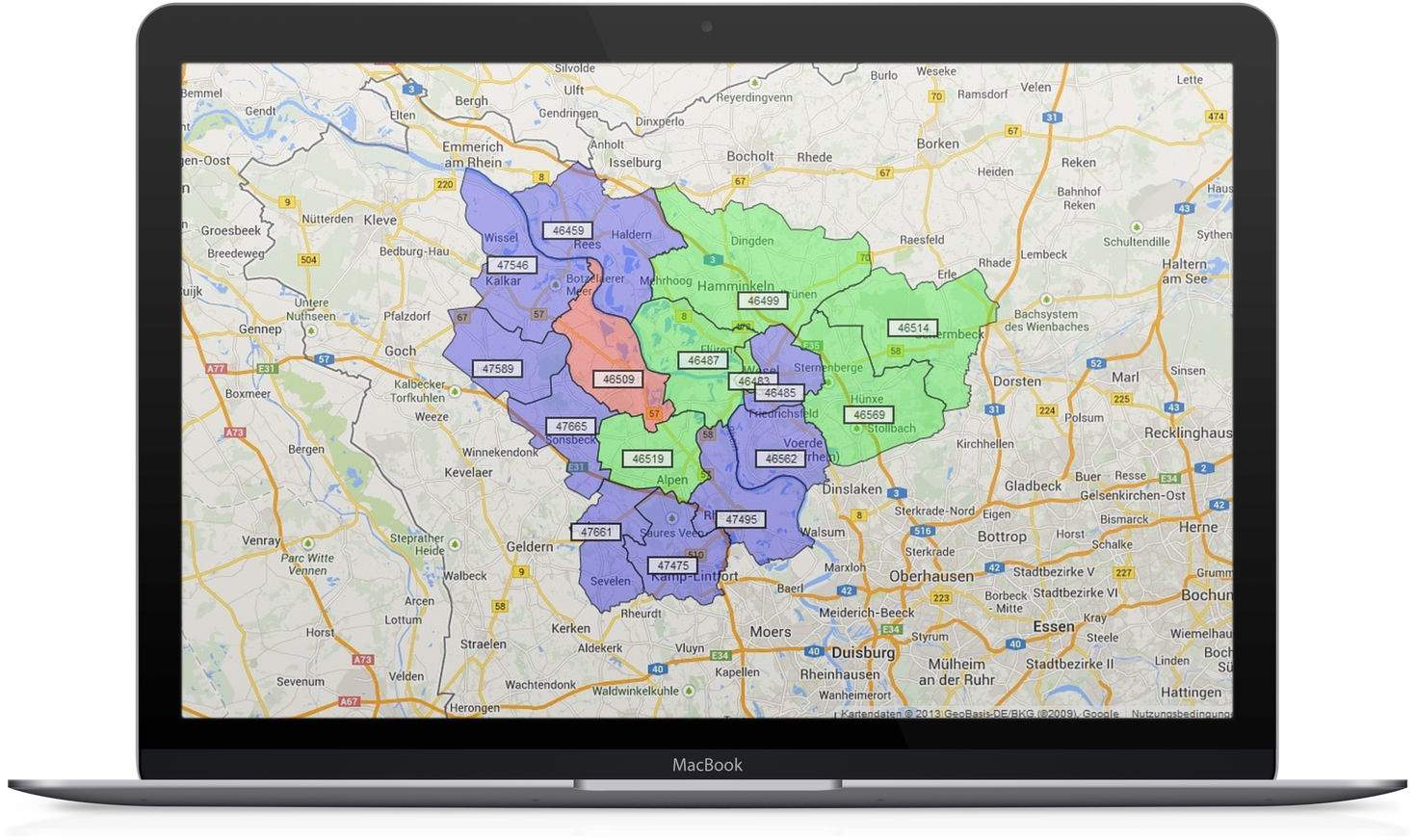
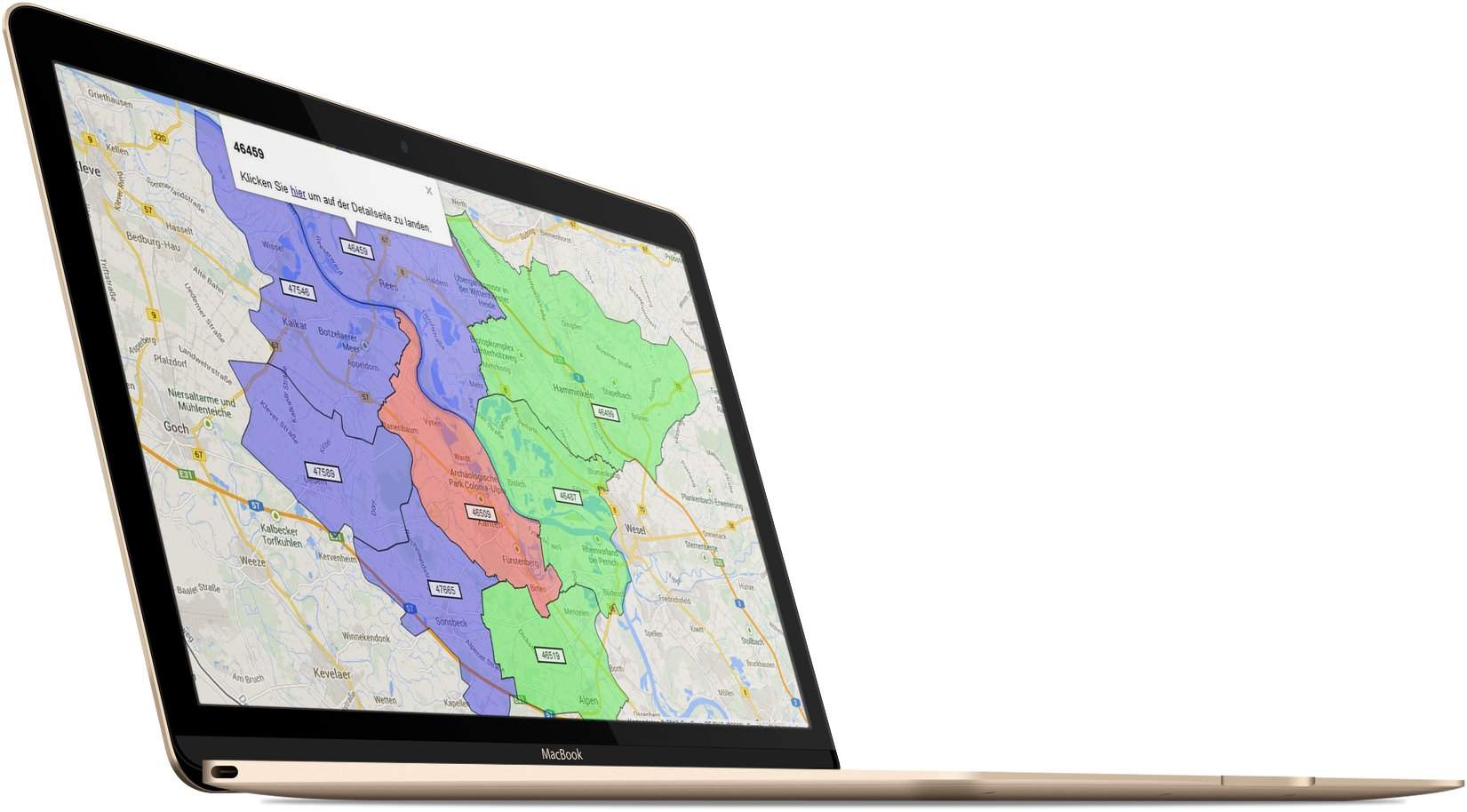
Google Maps® API postal code areas on a Macbook

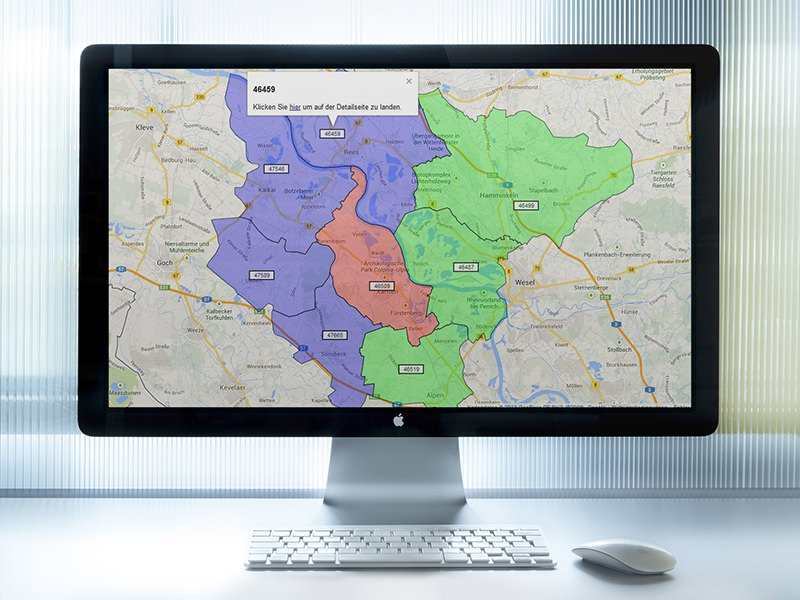
In addition, all area boundaries are indicated by a marker (the zip code). This marker can also be selected, which opens a popup that can again be equipped with any text. The example image shows that the zip code is displayed, as well as another text with a link, which also contains the zip code so that it can be used for other purposes.

The script reacts to GET parameters in the browser, which determine the color and selection of the postal codes. An example call with only one zip code would look as follows with the default settings: ?script.php?zip=46509&mColor=ff0000. The parameter names can be changed as required.

Since the aim of the project was to be able to mark surrounding zip codes for a main zip code with two different colors, there are additional parameters: script.php?zip=46509&mColor=ff0000&rZip=46459,47665&rColor=0000ff&fZip=46487&fColor=00ff00.

As can be seen in the example, several zip codes can also be entered, in this case separated by commas. The separator can also be changed as required. The script accepts 3 different types of zip codes, each with a color, and displays them in color on a Google Maps map.

The advantage of the implementation is that the script can be integrated into existing websites. Either as a dynamically moving map or as an image section. A possible application scenario could be a store that only delivers various products to certain regions. The script could be integrated into the detailed description of the products and display the regions to which the product can be delivered in two colors, for „immediately available“ or „currently sold out“. The script can also be expanded to include other colors and zip code types, so that a variety of other application scenarios would be possible.